How the keys work
Proper runs from plain keys pressed in the track list, with no text field in the way. This page explains how those keys combine. Every key is listed in Keys. On the iPhone, the same keys work from a hardware keyboard.
If you know vim, the movement keys behave as you expect. They are j, k, g g, Shift+G, Ctrl+D, Ctrl+U, z z, Ctrl+O and Ctrl+I. Most other keys are Proper’s own. m in particular files a track for a folder or a playlist and has nothing to do with vim’s marks.
On the Mac, the toolbar shows which mode the keys are in, beside the track count.
| Label | When | What the keys do |
|---|---|---|
| NORMAL | Most of the time | Each key is a command on the current track, the row the cursor is on |
| VISUAL | While a selection is open | Commands act on every selected track |
| EDIT | While you type into a field | Keys type text. Enter saves, and Escape cancels |
Shift+V opens a selection, and the keys that start with v select tracks by artist, genre or view. The keys that start with c, such as c t for the title, edit a field.
/ opens the search bar, which also takes your typing. Enter gives the keys back to the list and keeps the filter. The iPhone shows no mode label, and its selection mode starts from Select in the list’s … menu.
Keys typed in sequence
Section titled “Keys typed in sequence”Some commands are two or more keys pressed one after the other. g g is g, then g, and s t sorts by title. On the Mac, the keys you have typed so far show beside the mode label until the command runs.
m, ’ and “ start a longer sequence. Each opens a list of places, you type a mark or part of a name, and Enter takes the highlighted place. Filing a track for the folder marked t is m t Enter.
If you stop partway, the keys are dropped after a second and nothing runs. Multi-key timeout under General in Settings sets how long a sequence waits, and it is the only key setting, since keys cannot be remapped. A key with Ctrl held in the middle of a sequence drops the sequence and runs on its own.
Counts
Section titled “Counts”A number typed before a movement repeats it. 3 j moves down three rows, and 5 g g goes to line 5. A number before Shift+< or Shift+> nudges the beat grid that many steps.
Repeat the last action
Section titled “Repeat the last action”. repeats your last mark, staging, playlist add or removal, tag edit, cleared comment, find and replace, or tag clean, on the current track or the selection. Select some tracks, press ., and they get what the last ones got.
Back out with Escape
Section titled “Back out with Escape”Escape backs out one layer at a time, and Ctrl+C does the same. With a key sequence half typed, it drops that and nothing else. Otherwise it ends the selection, cancels an edit, or clears the search, one per press.
When a key answers in red
Section titled “When a key answers in red”A key that cannot run where you are, or a sequence that breaks, changes nothing, and a red line in the pill over the bottom of the track list says why. On the Mac the keys you typed turn red as well.
A key can be refused because of where you are, such as a cue key with no analyzed track playing. Beat grids and cues and Sorting files list the refusals of their keys. A sequence breaks when its next key means nothing after the keys before it, such as g followed by a key that no g command uses.
The keyboard legend
Section titled “The keyboard legend”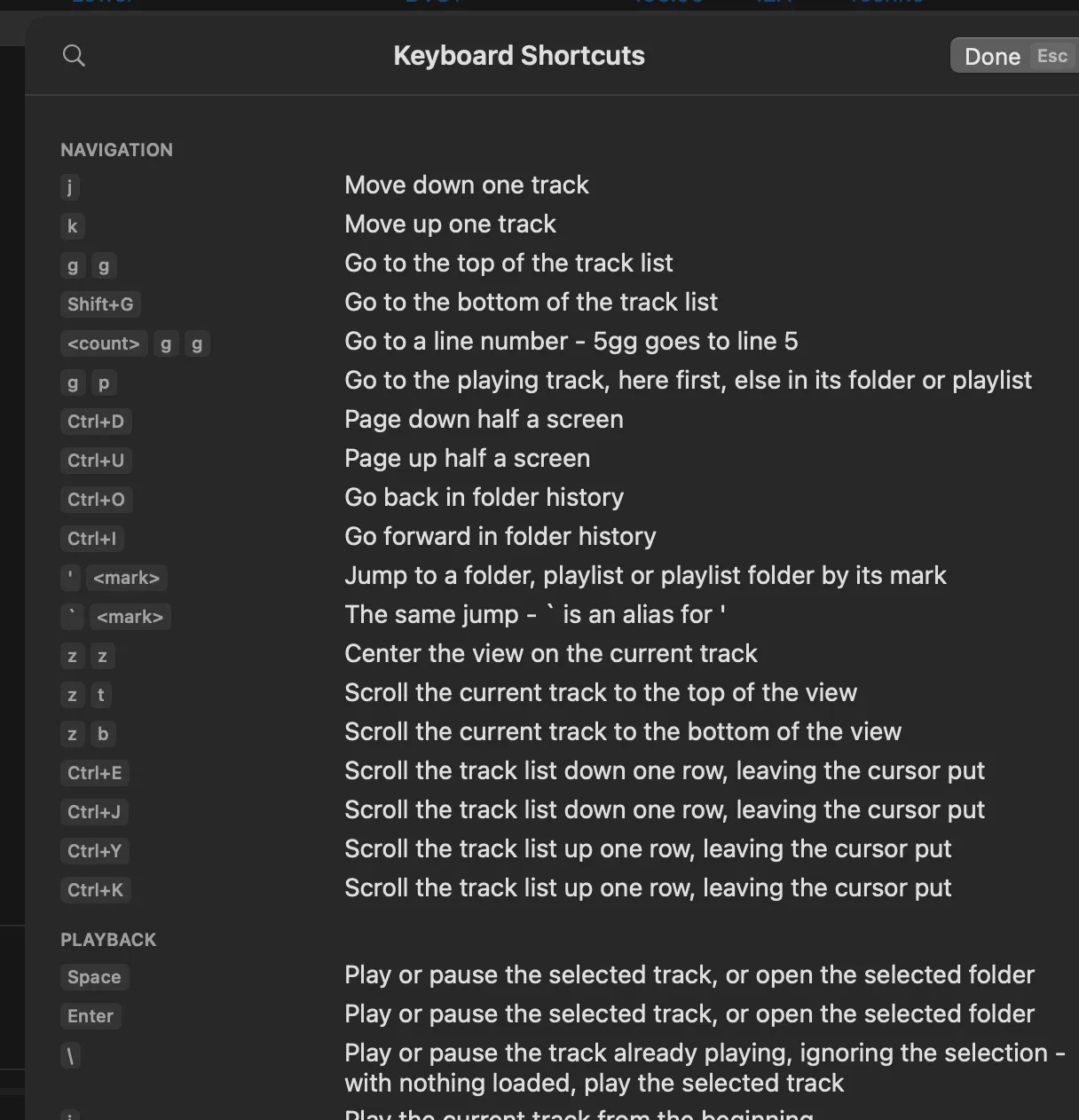
Press ? to open the keyboard legend, which lists every key of the version you are running and works offline. On the Mac, Help > Keyboard Shortcuts opens it too. Press / in it to search, either by a key such as ctrl j or by words from what the key does. Escape or ? closes it.