Library Health
When you move, rename or delete music files outside Proper, in Finder, in Files or in another app, the library still remembers them where they were. Library Health finds those entries and repairs them, so your playlists, cues and grids follow the files to their new places.
When to run Library Health
Section titled “When to run Library Health”Run it after you:
- move or rename music files in Finder or Files,
- delete music files outside Proper,
- see a track listed twice, or a track missing from a playlist group it belongs in.
Moves, renames and deletions you make inside Proper keep the library right by themselves, so they need no check.
Run the check
Section titled “Run the check”Press Ctrl+B to open Drives and Backups, then press h for Check Library.
Open Drives and Backups from the sidebar drawer, tap Library Health, then tap Check Library. The iPhone checks only the folders it has access to, and asks Files for a fresh listing of a folder before it reports a file there gone.
The check changes nothing. It only reports what a repair would do.
Read the findings
Section titled “Read the findings”The findings come in two lists. Would Repair is what a repair would change, such as moved files it found or tracks listed twice, and Skipped is what it would leave alone and why.
After a repair, the first list reads Repaired. Each finding is one short line, such as “3 moved or renamed files relinked” or “2 files deleted externally, purge pending (14 days)”, and the same lines appear in the status line. The tables under Details list them all.
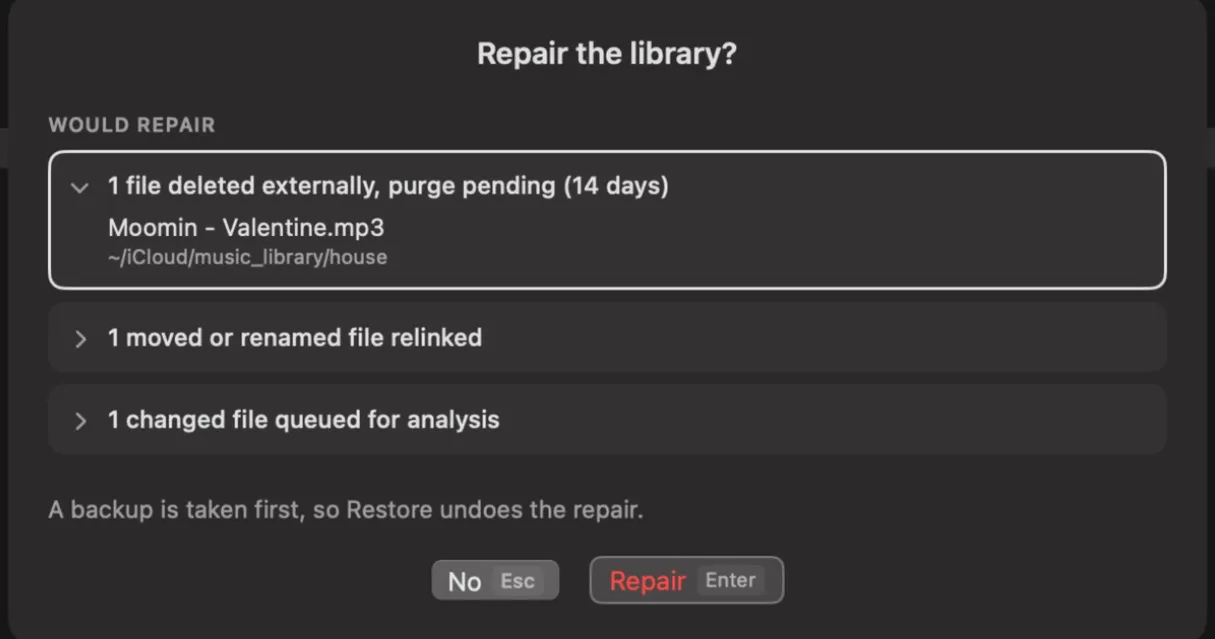
On the Mac, open a finding to see the files it names:
| Key | What it does |
|---|---|
| j / k | Move between findings |
| Space, l / h | Open or close the highlighted finding |
| Enter | Repair |
| Escape | Leave the library as it is |
Repair the library
Section titled “Repair the library”- Press Enter on the Mac, or tap Repair on the iPhone and confirm.
- Proper backs up the library, then repairs it. It relinks moved and renamed files, combines tracks listed twice, clears leftovers of deleted tracks and fills in playlist groups.
Restoring the backup listed as Before a repair undoes the repair. After a repair that changed something, you can no longer undo the steps you took before it.
A check the iPhone holds is dropped if a restore, a drive sync or import, a Rekordbox import, a move or a delete runs before you repair, so check again before repairing.
Files deleted outside Proper
Section titled “Files deleted outside Proper”When a file is deleted outside Proper, the repair waits 14 days before removing its track, in case your other device still has the file, and any device that has the file cancels the wait. After 14 days, the next repair on any device removes the track, with its playlist entries, cues, grid and analysis, on every device.
Unlike a file deleted outside Proper, a track you delete inside Proper is removed at once.
- A repair never moves a file to the Trash.
- A track whose folder is gone with its drive, such as an unplugged external drive, is left alone.
- Files gone from a staging folder are never waited on or removed.
Details
Section titled “Details”What a repair changes, listed under Would Repair or Repaired:
| Finding | Meaning |
|---|---|
| duplicate tracks combined | Two entries for one file become one |
| moved or renamed files relinked | A file moved or renamed outside Proper is found and its entry follows it |
| files deleted externally, purge pending (14 days) | The wait in Files deleted outside Proper |
| files in a deleted folder, purge pending (14 days) | The same, for a whole folder that is gone |
| deleted tracks purged | The wait ended and the tracks were removed, with the analysis space freed |
| Purge canceled for tracks, file on this device | This device still has the file, so its track stays |
| expired purge records cleared | Old bookkeeping of finished purges removed |
| missing tracks (tags only) removed on this device | A missing file whose entry held nothing but tags is forgotten here only, since another device may have it |
| orphaned entries cleared | Cues, grids and playlist entries left behind by tracks already gone |
| tracks added to playlist groups | A group’s playlist gets tracks the playlists inside it hold |
| case-duplicate playlist folders merged | Two folders spelled alike except for case become one |
| missing parent folders restored | A playlist’s folder that went missing is recreated |
| Analysis removed from tracks in analysis-disabled folders | Leftover analysis in folders with analysis turned off |
| tracks fingerprinted | Proper records each file’s audio, to notice when it is replaced |
| changed files queued for analysis | A file whose audio was replaced is lined up to be analyzed again |
| iCloud records of deleted tracks removed | Analysis, grids, keys or cues in iCloud for tracks no device holds, unchanged for 24 hours. These are checked only while sync runs |
What a repair leaves alone, listed under Skipped:
| Finding | Meaning |
|---|---|
| not fingerprinted, file not downloaded | The file is in iCloud only |
| missing files outside this device’s folders | This device cannot tell whether they are gone |
| iCloud not checked (unreachable) | No connection to iCloud during the check |
| missing files not matched yet, folder not downloaded | The folder must download before Proper can look for the file |
| missing files kept (playlists, cues or analysis) | Gone, but holding work, and not where Proper can tell the file was deleted |
| missing files with several possible matches | More than one file could be the moved one, so none is picked |
| playlists named after a former playlist group | A playlist still carries the name of a folder that is no longer a playlist group |